Calling Using Your Business Phone Number
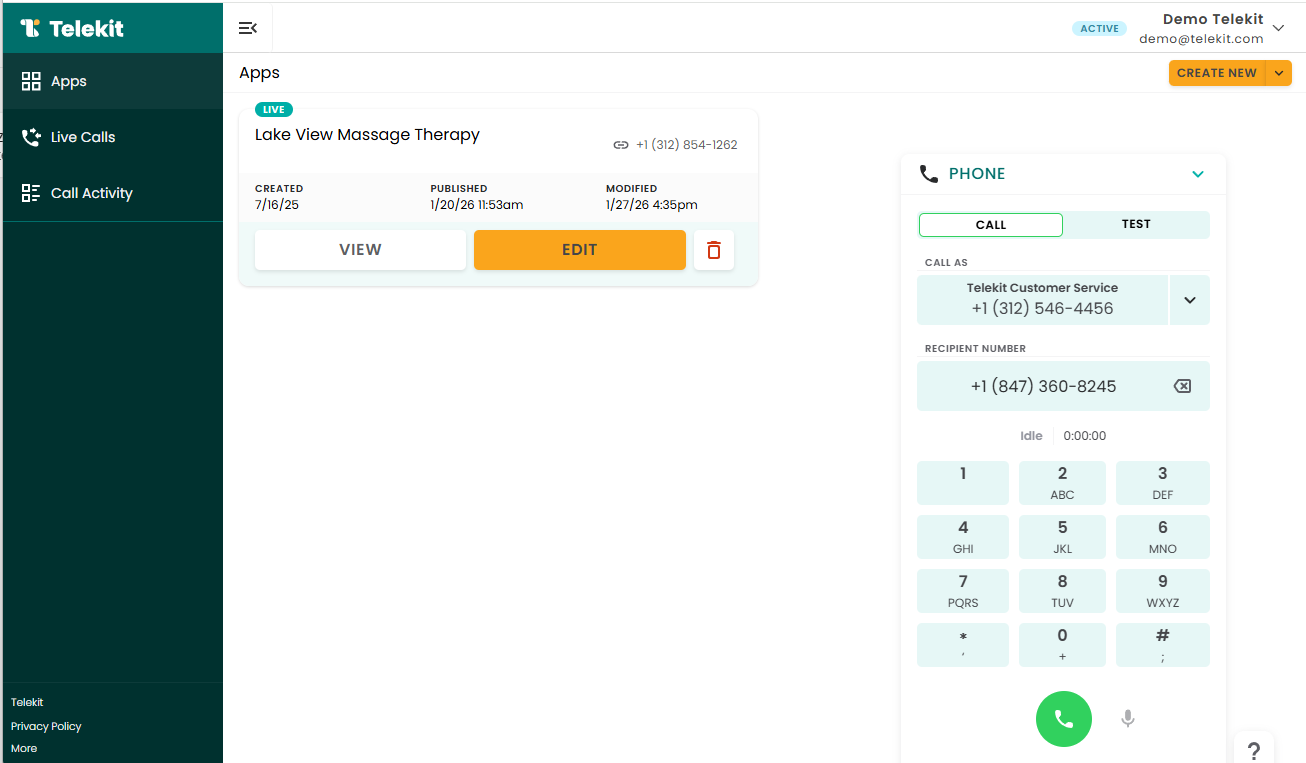
Telekit enables you to call 10-digit US phone numbers directly from your browser. Your customers will see your business phone number on their caller ID. This ensure consistent branding and prevents you from needing to share your personal phone number with your customers.
Call a customer from your Telekit browser
1) Create a Telekit account
2) Create an application
3) Get a business phone number
4) Click on the 'Phone' dialpad on the bottom right
5) Enter a 10 digit phone number
6) Click the call button
Test your application from you Telekit browser
1) Create a Telekit account
2) Create an application
3) Get a business phone number
4) Fill out the application details and publish it
5) Click on the 'Phone' dialpad on the bottom right
6) Toggle to 'Test' tab on the dialpad. Select the application/phone number you want to test
7) Click the call button
Once published, make a few test calls and have a conversation with Maya. Start improving operational efficiency and customer interactions with Telekit today!