What is Telekit’s Conversational AI Appointment Manager?
Meet Maya, the scheduling AI bot that personalizes the caller experience and manages appointments directly on your Square business calendar. This tool helps automate routine tasks like appointment management while keeping interactions professional, personal, and helpful.
What can it do?
The Appointment Manager can handle several tasks while having a natural conversation with your customers:
- Create new customer entries
If a new customer calls, Telekit can automatically create a customer profile using their phone number which helps convert leads into actual customers. - Check real-time availability and schedule appointments
Maya can check availability in real time, capture service type, location, and service provider, and create appointments directly in your Square calendar. - Manage existing appointments
Customers can retrieve appointment details, cancel, or reschedule as needed. - Share business information
Provide details like business hours, location, or address. - Send appointment notifications
Automatically trigger appointment notifications using Square’s existing SMS service.
How do I use it for my business?
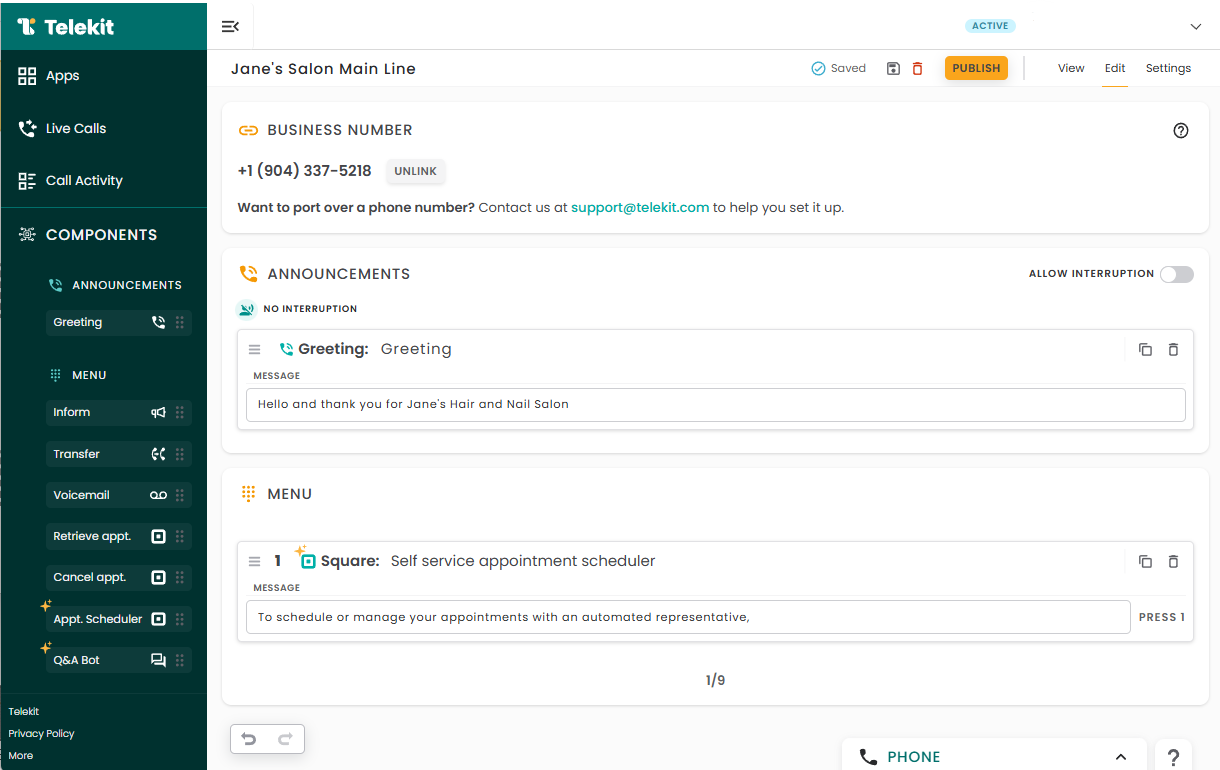
You can set up the Appointment Manager in just a few minutes and requires no coding or technical skills:
- Sign up for a Telekit account and verify your email address.
- Connect your Square account to Telekit. Learn more.
Note: A Square Plus or Premium plan is required for this feature. - Create your application and get a phone number. Assign the phone number to the application. Learn more.
- Drag and drop the Appointment Scheduler from the left panel.
- Publish your application.
- Make a test call.
Need help?
If you have any questions, feel free to call (+1 312-546-4456) or email us (support@telekit.com) and we’d be happy to help. If you would like us to integrate with your favorite scheduling software, let us know!